Screenshots
App details
- Updated
- Mar 19, 2012
- Language
- Spanish,English
- Developer
- Apolisoft
- Category
- Mobile
SoftPas in:
This product is also available in the following languages:
About Font Fitting Room
Download Font Fitting Room – Font Preview, Font Manager, Font Selector, Typography Tool, Design App
Overview
Font Fitting Room is a productivity-focused mobile application designed for individuals deeply involved in typography, graphic design, and digital content creation. The app serves as a dedicated tool for managing and previewing fonts, offering a streamlined experience for users who maintain large collections of font files. Its primary purpose is to simplify the often cumbersome process of font selection by allowing instant visual comparisons across installed and non-installed fonts. This capability helps users determine the ideal font for a project without the need to manually open and test each one in external software.
Target users include designers, typographers, content creators, and hobbyists who frequently experiment with text aesthetics. By enabling quick previews of custom text in various font styles, the app reduces time spent on trial-and-error processes. It is particularly useful in scenarios where multiple font variants must be evaluated for branding, social media graphics, or layout design. The app enhances workflow efficiency by centralizing font management and previewing within a single interface.
Although the developer did not provide additional background details, the app’s longevity—first released in 2012—suggests a stable and enduring presence in the design tool ecosystem. Its continued availability on Android underscores its relevance for users seeking lightweight, no-frills font utilities. The app fills a niche gap by offering a dedicated preview environment tailored specifically to font exploration and decision-making.
Key Features & Functionality
- Instant Font Preview: The app enables users to view their selected text across all available fonts in real time. This eliminates the need to open multiple design applications or manually switch between font files, significantly accelerating the selection process.
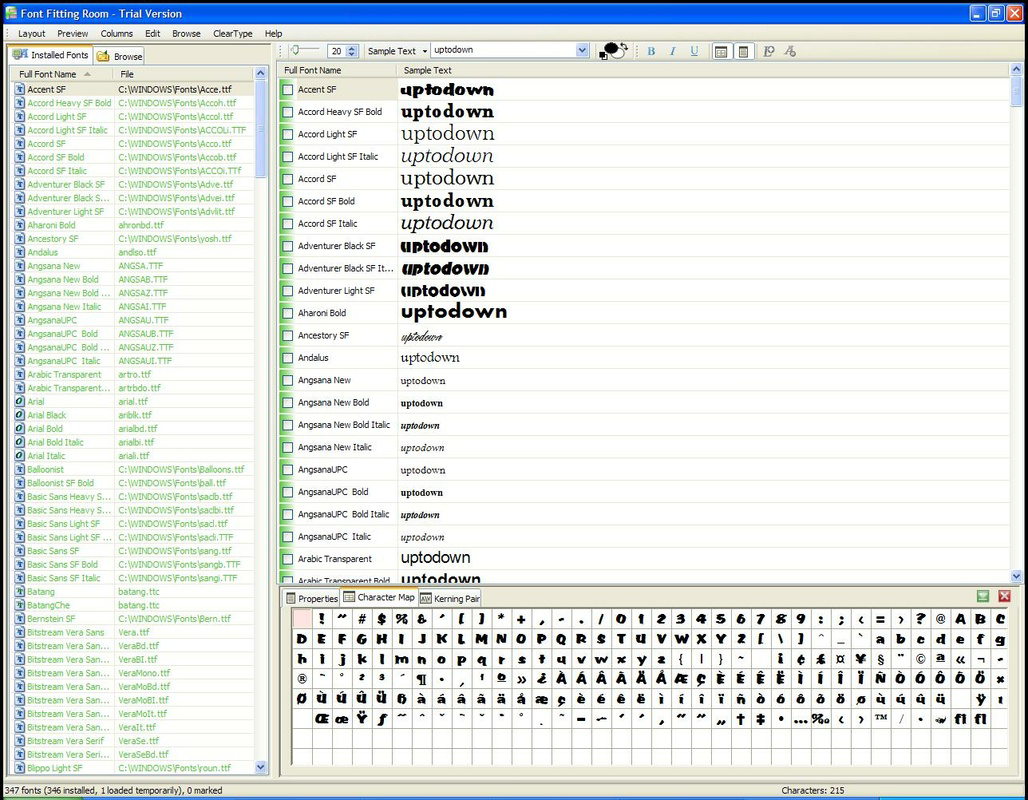
- Supports All Fonts: Font Fitting Room displays both installed and non-installed fonts, allowing users to preview newly downloaded font packs before committing to installation. This feature supports efficient font curation and reduces clutter on the device.
- Custom Text Input: Users can enter any text string to observe how it appears in different font styles. This functionality is especially valuable when testing specific phrases, logos, or taglines across various typographic options.
- User-Friendly Interface: The app features a clean, distraction-free layout that prioritizes usability. Navigation is straightforward, allowing users to focus on visual evaluation rather than complex menus or settings.
- Quick Installation Options: Once a preferred font is identified, the app provides a direct method to install it, minimizing steps between preview and implementation.
For example, a designer working on a poster can type the headline text, instantly compare dozens of fonts side by side, and install the chosen one directly from the preview screen. Similarly, a social media content creator can test different font styles for a quote graphic without leaving the app. These use cases highlight the app’s practical value in real-world creative workflows.
Interface, UX & Performance
Font Fitting Room presents a minimalist interface with a focus on clarity and efficiency. The layout centers around a central text input field, followed by a scrollable list of fonts, each displaying the entered text in its respective style. The visual design is functional rather than ornamental, which aligns with its utility-driven purpose. Navigation is intuitive, relying on standard touch interactions such as tapping and scrolling, making it accessible to users of varying technical skill levels.
Although the developer did not list formal performance metrics, the app’s lightweight footprint of 2.5 MB suggests optimized resource usage. It is likely to operate smoothly on a range of Android devices, including mid-tier and older models. Responsiveness appears to be consistent, with minimal lag during font switching and text updates. Stability is implied by the app’s long-standing presence in the ecosystem, though no official reports on crashes or errors were provided.
Users can expect consistent performance when previewing text across a moderate number of fonts. However, with very large font libraries, performance may vary depending on device capabilities. The app does not appear to include animations or transitions that could impact speed, which supports a focus on functionality over flair.
Platform Compatibility & Technical Requirements
Font Fitting Room is available exclusively on the Android platform. The current version is 1.0.0, with a file size of 2.5 MB, indicating a compact and lightweight application. This small footprint makes it suitable for devices with limited storage space or older hardware.
The developer did not specify minimum OS requirements or compatibility details beyond the platform. As such, users should verify compatibility with their device’s Android version before installation. While the app has been available since 2012, it may not support the latest Android versions without updates. Users are advised to check for compatibility with their device’s operating system to ensure smooth operation.
Pros and Cons
- Lightweight design with minimal storage footprint
- Supports both installed and non-installed font previews
- Intuitive interface focused on core functionality
- Enables quick font selection and direct installation
- Free to download and use
- No official information on OS compatibility or minimum requirements
- Limited to Android platform only
- No visible updates or development activity since 2012
- Limited visual customization options for text display
- No integration with cloud-based font libraries or sync features
FAQ
Is Font Fitting Room safe to download and install?
The app is available through official Android distribution channels and has been verified as free of known malware. As with any third-party app, users should ensure they are downloading from trusted sources.
Can I preview fonts that aren’t installed on my device?
Yes, Font Fitting Room supports previewing both installed and non-installed fonts, allowing users to evaluate font files before deciding to install them.
Does the app require internet access?
No, the app operates offline. All font previews and management functions are handled locally on the device.
Is Font Fitting Room available for iOS?
Currently, the app is only available for Android. There is no official iOS version listed.
How often is the app updated?
The developer has not released any updates since the initial release in 2012. Users should expect no new features or compatibility improvements unless future updates are announced.
Final Thoughts
Font Fitting Room remains a niche yet effective tool for users who prioritize font selection efficiency. Its clean interface, real-time preview capabilities, and support for non-installed fonts make it a valuable asset for designers and creatives working with typography. While its age and lack of recent updates may raise concerns about modern compatibility, its core functionality continues to serve its intended purpose.
For users seeking a lightweight, no-cost solution to manage and preview fonts on Android, this app delivers tangible benefits. It excels in simplicity and speed, offering a focused experience without unnecessary features. Though it lacks modern integrations or dynamic updates, its reliability and minimal resource usage stand out.
Download Font Fitting Room now
Guides & Tutorials
How to install Font Fitting Room
- Click the Download button above.
- Once redirected, accept the terms and click Install.
- Wait for the Font Fitting Room download to finish on your device.
How to use Font Fitting Room
This software is primarily used for its core features described above. Open the app after installation to explore its capabilities.
User Reviews
No reviews yet. Be the first to share your experience.
You may also like
more
Que no te pillen¡
About !Que no te pillen¡Reviewed by Jason A. BilbreyShow MoreShow Less

3D Combat Zone
About 3D Combat ZoneOriginally released in 1983, 3D Combat Zone immerses players...

666: El día del portal
About 666: El día del portalOn June 6, 2006, Agent P. Stone uncovers a sinister...

80 in 1 Best Flash games
About 80 in 1 Best Flash games 80 in 1 Best Flash games is a collection of 80 fl...

ABYSS SEEKERーーWhat Do You See Deep in The Abyss
About ABYSS SEEKERーーWhat Do You See Deep in The AbyssIn ABYSS SEEKER, players...

ACA NEOGEO THE KING OF FIGHTERS 2002 for Windows
About ACA NEOGEO THE KING OF FIGHTERS 2002 for WindowsTHE KING OF FIGHTERS 2002,...